![Omr_reviews_Logo_Black_Rgb_2000px_w_72ppi (2)-3.png]](https://hi.omr.com/hs-fs/hubfs/Omr_reviews_Logo_Black_Rgb_2000px_w_72ppi%20(2)-3.png?height=40&name=Omr_reviews_Logo_Black_Rgb_2000px_w_72ppi%20(2)-3.png)
In this article, you'll find the following information 👇
Reviews that are more than 12 months old often no longer reflect the current state of your product or the user experience. At the same time, older reviews are given less weight in the ranking. This is particularly unfortunate when the feedback is very positive and actually represents your product well.
To help you identify such reviews more quickly, OMR Manager displays outdated reviews in a separate tab. There, you can specifically check which reviews should be updated and invite reviewers directly to revise their existing reviews.
A profile with many old reviews may rank lower than a competitor's profile with fewer but more recent reviews, even if the older reviews are very positive.
Why up-to-date reviews matter
Reviews on OMR Reviews directly influence a tool’s ranking within its category. Reviews older than 12 months carry less weight in the overall ranking. This means that a provider with many older reviews may rank lower than a competitor with fewer but more recent reviews.
Up-to-date reviews benefit everyone involved:
| Who | Advantage |
| Provider | A higher ranking in the category and greater visibility among potential buyers |
| Buyers | More relevant and trustworthy feedback that reflects the current state of the product |
| OMR Reviews | Higher data quality and greater credibility on the platform |
A review is considered outdated if it was published more than 12 months ago. Outdated reviews are not deleted. They remain visible on the profile but are factored into the OMR Score with reduced weight until they are updated.
Where to find outdated reviews
You can find outdated reviews in OMR Manager under:
Event Manager → Reviews → Overview → “Outdated Reviews” tab
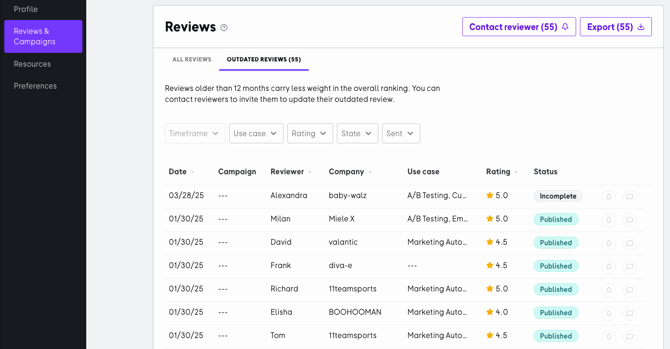
This tab displays all reviews that are more than 12 months old. You can also narrow down the list using various filters, such as:
-
Use Case
-
Rating
-
Status
-
Reminder sent / not sent
This allows you to identify particularly relevant reviews more quickly.
Important to know:
-
The number of reviews displayed updates automatically when you apply filters.
-
The date range filter is disabled in the “Outdated reviews” tab, as that tab always displays all reviews older than 12 months.
Invite reviewers to update their reviews
For outdated reviews, OMR Manager offers a feature that allows you to contact reviewers directly and ask them to update their existing reviews.
Instead of collecting only new reviews, you can also have existing feedback updated if something has changed since the original review or if the review no longer reflects the current situation. This is useful, for example, if your software has improved significantly or if its scope of use has changed.
After a successful update, the review is immediately incorporated into the OMR Score and can thus impact your ranking on OMR Reviews.
How to invite reviewers to update their reviews
Step 1: Go to the “Outdated Reviews” tab
The “Contact Reviewers” button is only active in the “Outdated Reviews” tab. It is disabled in the “All Reviewer” tab.
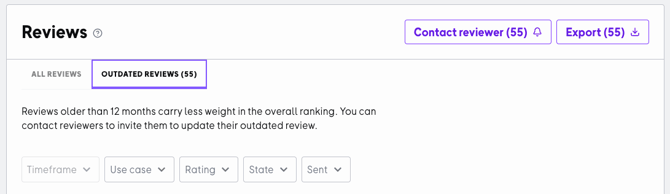
Step 2: Click “Contact Reviewers”
The button appears in the top-right corner of the table, next to the export button. It displays the number of reviewers who have not yet been contacted, for example: “Contact Reviewer (4)”. You can contact all of them at once in the next step.

The button is disabled when the counter is at 0. In this case, all eligible evaluators have already been contacted.
Step 3: Confirm in the send dialog
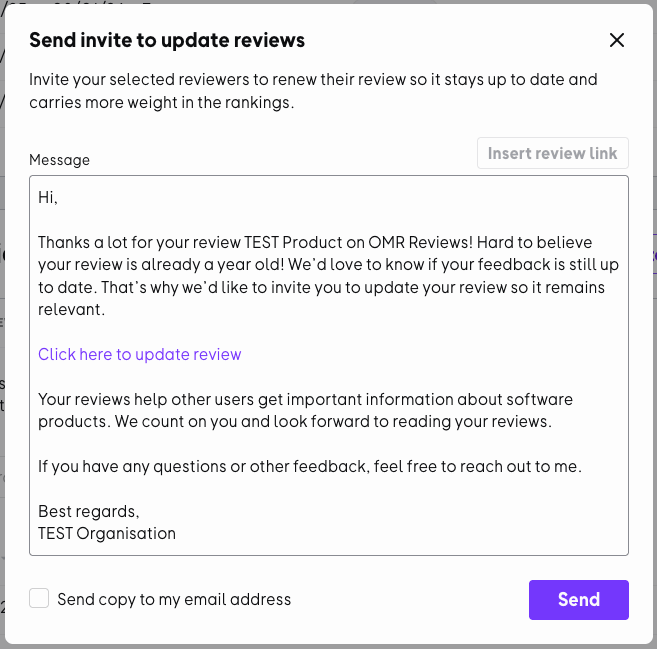
After clicking, a dialog box opens with:
-
a title and description of the request
-
a preview of the reminder email
-
a “Send a copy to me” checkbox
-
an X button to close the dialog box without sending
After you confirm, a reminder email will be sent simultaneously to all eligible reviewers.
In order for a review to be updated, at least one substantive change is required. Simply confirming the previous statement without making any changes is not sufficient.
Use a pre-written message directly in OMR Manager
When you send a request for an update, you don’t have to start from scratch. OMR Manager already includes a pre-written message that you can use right away.
This template helps you reach out to reviewers quickly and easily. You can customize the text as needed to make the context more specific for your customers.
You can also select incentivized campaign links here to encourage reviewers to update their reviews.
.png?width=670&height=707&name=image%20(115).png)
Reminder Limits and Restrictions
The following limits apply to reminders for updating outdated reviews:
| Limitation | Value |
| Max. number of reviews per review | 3 in total |
| Minimum interval between reminders | 45 days |
Reviewers who have reached the maximum number of invitations will not be included in future bulk mailings.
In addition, a notification icon in the respective review row shows you the current status of a review, for example:
-
Reviewer has already been contacted; next invitation possible in X days
-
Maximum number of invitations reached
When a request for an update is particularly worthwhile
A request is particularly worthwhile if something has changed since the original review, for example:
-
new or improved features
-
a changed use case
-
noticeable improvements in support or onboarding
-
new experiences in the daily use of the tool
The more specific the reason, the more understandable the request will be to the reviewer, and the more likely it is to result in a helpful update.
Frequently Asked Questions
What counts as an outdated review?
Reviews are considered outdated if they were published more than 12 months ago.
Can I contact reviewers directly from OMR Manager?
Yes. For outdated reviews, you can invite reviewers directly through OMR Manager to update their existing review.
Does the review have to be changed when it is updated?
Yes. For a review to be updated, at least one change to the content is required.
Is there a message template for this request?
Yes. The OMR Manager already includes a pre-written message that you can use as is or customize as needed.
Can I send an incentivized link for this request?
Currently, no. There is currently no option to send an incentivized link for the request to update outdated reviews.
Why is the “Contact Reviewer” button grayed out?
Either you are in the “All Reviews” tab and need to switch to the “Outdated Reviews” tab first, or all eligible reviewers have already been contacted.
What should I do if a reviewer didn’t receive the email?
Check the notification icon in the review row. There you’ll see when the next reminder can be sent. Also ask the reviewer to check their spam folder.
Can I send a reminder to just one reviewer?
The bulk invitation contacts all eligible reviewers at the same time. For individual reminders, please use the reminder feature in the details view of the respective review.
Why does the number of outdated reviews change after applying a filter?
The number always reflects the currently filtered view. As soon as you apply filters, the number is updated accordingly.
Are outdated reviews deleted?
No. They remain visible on the profile but carry less weight in the ranking until they are updated.
Current reviews make your profile more meaningful and relevant to potential buyers. The tab for outdated reviews helps you keep track of older reviews and update them systematically.
This way, you can improve the quality of your profile with feedback that better reflects your product’s current status and can positively influence your OMR score and ranking.