![Omr_reviews_Logo_Black_Rgb_2000px_w_72ppi (2)-3.png]](https://hi.omr.com/hs-fs/hubfs/Omr_reviews_Logo_Black_Rgb_2000px_w_72ppi%20(2)-3.png?height=40&name=Omr_reviews_Logo_Black_Rgb_2000px_w_72ppi%20(2)-3.png)
In this article, you'll find the following steps 👇
The AI Visibility Dashboard is a trend indicator, not an absolute benchmarking tool. Use the data to recognize trends, identify opportunities, and determine priorities for optimization measures.
Individual daily figures may fluctuate. Meaningful trends only emerge over a longer period of time.
Focus on trends rather than snapshots
The most valuable insights come from analyzing data over several weeks. In particular, use the time-series charts in the “Brand Performance Over Time” section to identify changes and trends early on.
We recommend monitoring the data for at least two to three weeks before using it to make strategic decisions.
Metrics Breakdown
The Metrics Breakdown provides you with a concise overview of the most important metrics for your AI Visibility. It helps you better understand your brand’s visibility in AI-generated responses and pinpoint areas for optimization.
Learn more about the individual metrics and the dashboard layout:
👉 The KPI tiles
👉 Dashboard layout
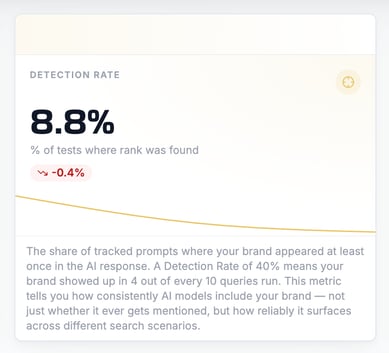
1. Start with the Detection Rate
The Detection Rate answers the fundamental question:
Is your brand even being noticed?
If your Detection Rate is low (below 20%), your content and your brand rarely appear in relevant AI responses. In this case, you should first focus on building your presence and authority.
2. Compare Mentions and Citations
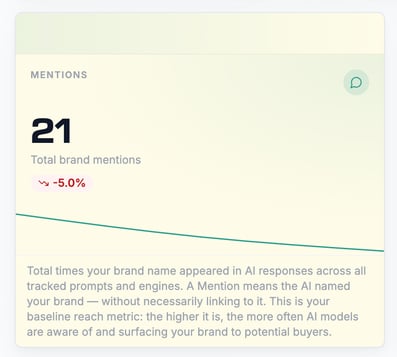
Mentions reflect your brand's sheer presence.
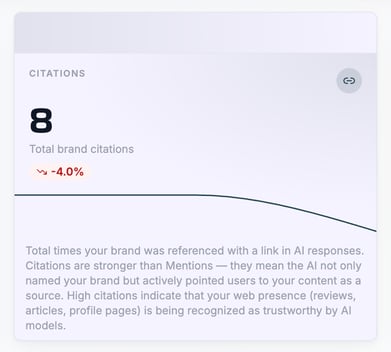
Citations show whether AI systems actively use your content as a source.
A common scenario:
-
High Mentions
-
Low Citations
This often means that while your brand is well-known, your content is not yet sufficiently perceived as a trustworthy reference.
This is often where the greatest potential for optimization lies.
3. Check the Sentiment Score
Visibility alone is not enough.
How your brand is portrayed is also crucial.
A positive sentiment score indicates that your brand is associated with relevant benefits, positive reviews, or strong market positions.
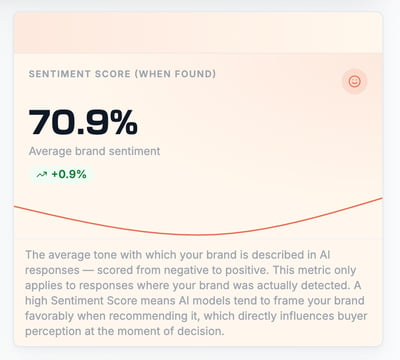
Neutral or negative reviews, on the other hand, can influence the perception of potential buyers, even if your visibility is already high.
4. Use Competitor Comparisons as a Guide
The “Mentions by Competitors” section
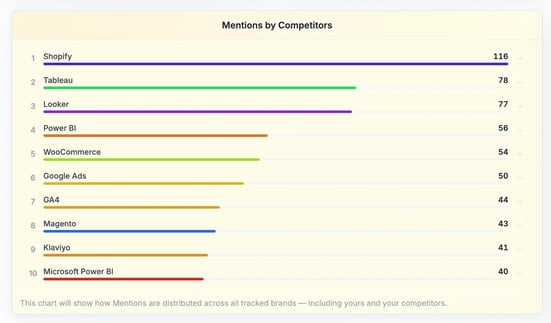
and “Citations by Competitors” helps you better assess your position in the market.
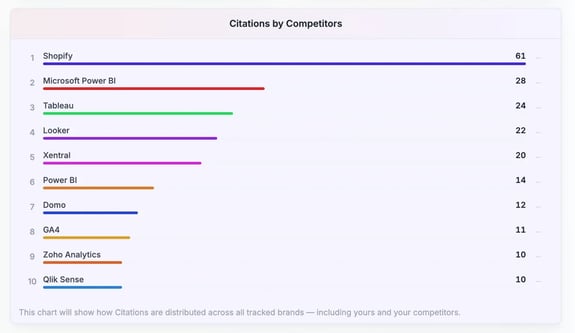
If competitors consistently rank higher in mentions or citations, this often indicates a stronger content presence, greater authority, or better discoverability of their content.
Use these insights to identify specific opportunities to optimize your own AI visibility.
Important Note
The background colors of the KPI cards are for orientation purposes only:
-
Green represents presence and reach (e.g., mentions, citations).
-
Yellow-orange indicates consistency (e.g., detection rate).
-
Shades of red represent qualitative signals (e.g., sentiment score).
The colors should not be interpreted as a direct assessment of “good” or “bad,” but rather are intended to help you quickly categorize the various metrics.