![Omr_reviews_Logo_Black_Rgb_2000px_w_72ppi (2)-3.png]](https://hi.omr.com/hs-fs/hubfs/Omr_reviews_Logo_Black_Rgb_2000px_w_72ppi%20(2)-3.png?height=40&name=Omr_reviews_Logo_Black_Rgb_2000px_w_72ppi%20(2)-3.png)
In this article, you’ll find the following content 👇
What is the OMR Reviews Score Widget?
The OMR Reviews Score Widget is an HTML element designed for easy integration into your website. It displays your agency’s current average rating and the number of reviews on OMR Reviews in real time. The display updates automatically with every new review.
As a social proof element, the widget builds trust right where potential clients make their decisions. It shows at a glance that your agency has received positive reviews from real clients on an independent platform like OMR Reviews.
By linking to your OMR Reviews agency profile, the widget not only strengthens your brand perception but can also positively impact the conversion rate on your website. With just one click, potential clients are taken directly to your agency profile on OMR Reviews, where they can read authentic testimonials and project feedback from real clients. This helps you build additional trust in your agency’s services.
How to Find the Widget in OMR Manager
You can find your OMR Reviews Score Widget in OMR Manager under “Agencies & Services” in your agency profile view, in the “Resources” tab. There, you’ll find four variants that you can use flexibly depending on your website’s design:
Standard: Black OMR Reviews logo on a white background
Inverse: White OMR Reviews logo on a black background
Standard Transparent: Black OMR Reviews logo on a transparent background
Inverse Transparent: White OMR Reviews logo on a transparent background
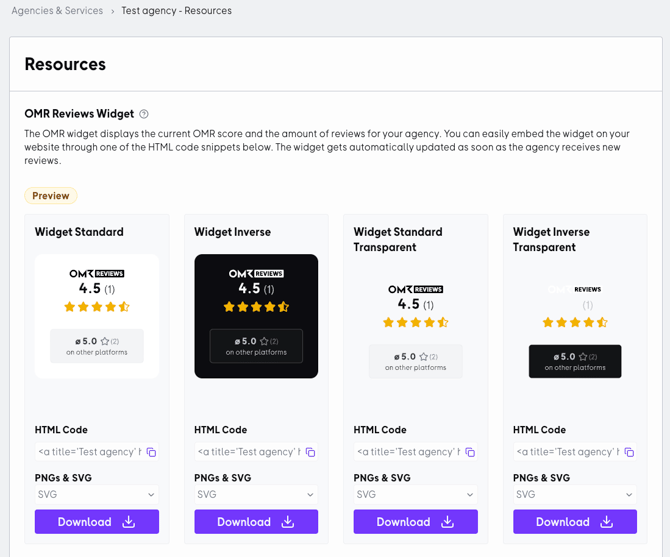
The HTML code provided in the OMR Manager already includes a built-in link to your OMR Reviews agency profile. This isn’t just convenient for visitors—it also offers you strategic advantages:
SEO signal through high-quality, thematically relevant links:
Search engines evaluate links as signals of relevance and trust. A link to an established review source helps position your agency more effectively within the appropriate context.
Greater visibility in AI-based search and response systems (GEO / AI Visibility):
AI systems such as ChatGPT, Gemini, or Perplexity are increasingly relying on structured web signals, reviews, and linked entities to better understand providers and include them in relevant responses. If your website has high-quality, contextually relevant links (e.g., to your OMR Reviews profile), you strengthen the semantic connection between your agency, your services (e.g., “Marketing Services”), and a trustworthy source. This can help ensure that your agency is better captured in AI knowledge graphs and increase your visibility in AI-generated results.
Here's how to find the widget in OMR Manager
Select the widget option you want to embed on your website. Then copy the code snippet from the text box below the selected widget.
To ensure that the widget works properly and displays correctly, there are a few things you should keep in mind:
-
Please use only the provided code snippet exactly as it is.
-
You should avoid making any changes to the code to ensure that everything runs smoothly.
If you follow these instructions, the widget will display properly on your website and will always be up to date.