![Omr_reviews_Logo_Black_Rgb_2000px_w_72ppi (2)-3.png]](https://hi.omr.com/hs-fs/hubfs/Omr_reviews_Logo_Black_Rgb_2000px_w_72ppi%20(2)-3.png?height=40&name=Omr_reviews_Logo_Black_Rgb_2000px_w_72ppi%20(2)-3.png)
The system notifications you receive from OMR Reviews via email inform you about three key areas:
-
New reviews, milestones, and awards: you will receive updates on new reviews on your OMR Reviews profile, milestones achieved (e.g., your 20th or 40th review), and newly awarded badges.
-
Contact requests and downloads: you will be notified when contact requests are received via the “Contact” button or when users use the download section.
-
Identified companies (buyer intent data): depending on the package you choose, you will receive information about unmasked companies that have had contact with your OMR Reviews profile.
👇 How to correctly store email addresses for system notifications:
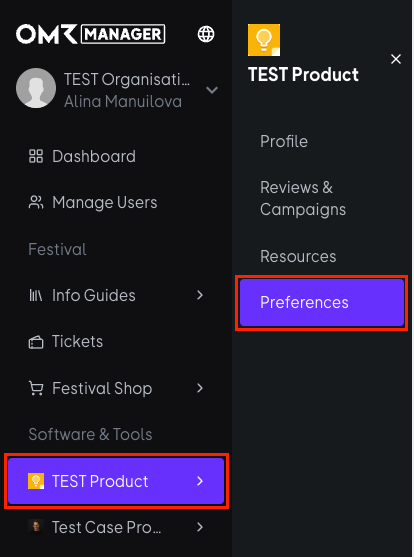
1. Log in to OMR Manager and select your product. Then navigate to the “Preferences” tab in the menu.
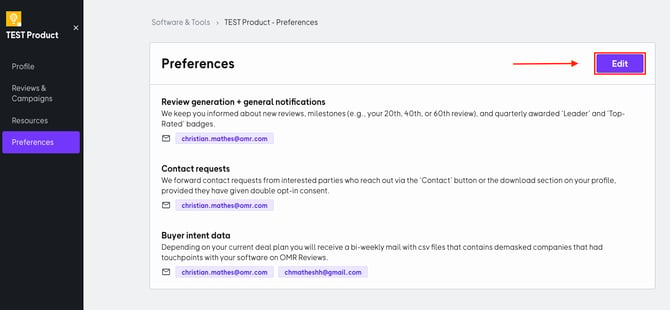
2. Click on “Edit” and enter the relevant email addresses for receiving our system notifications.
3. Enter the email addresses in the fields provided for the respective distribution lists and confirm your entry by pressing the Enter key. Then click on “Save” to apply the changes.
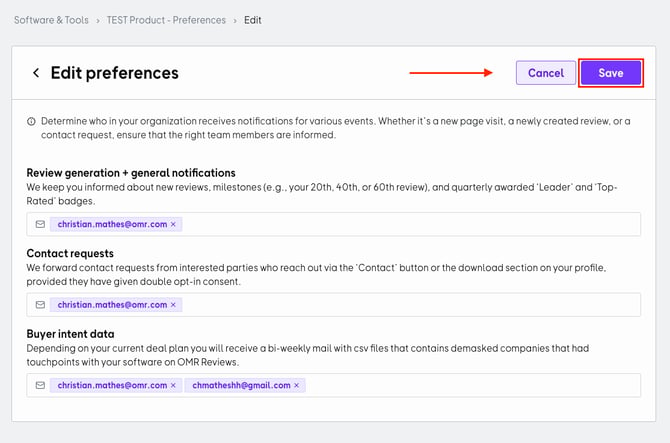
Enter relevant email addresses so that you don't miss any important system notifications right from the start.