![Omr_reviews_Logo_Black_Rgb_2000px_w_72ppi (2)-3.png]](https://hi.omr.com/hs-fs/hubfs/Omr_reviews_Logo_Black_Rgb_2000px_w_72ppi%20(2)-3.png?height=40&name=Omr_reviews_Logo_Black_Rgb_2000px_w_72ppi%20(2)-3.png)
It is not easy to make a decision in favor of new software. To make this easier, at least at tech & compliance level, you can inform potential customers about your setup & support offer and your data protection standards in the “General features” section. Data protection plays a key role in Germany in particular, as strict regulations such as the GDPR ensure the protection of personal data. You can also indicate whether you provide a free (trial) version. This information creates trust and conveys security in your product.
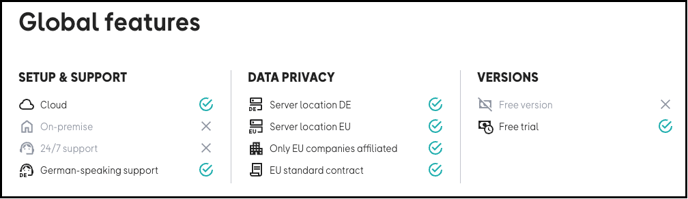
The global features can be configured in the OMR Manager in the “Global features” tab via a checkbox selection. However, the available versions (free trial version and/or free version) are not selected directly there, but result from the stored price plans. As soon as a free price plan is created, this is automatically displayed in the general features. Similarly, the “Free trial version” only appears in the general features if it is activated in the price options of a price plan using the “Free trial” text option.
To change or update the features, log into your OMR Manager account and follow the tutorial.👇
Step 1
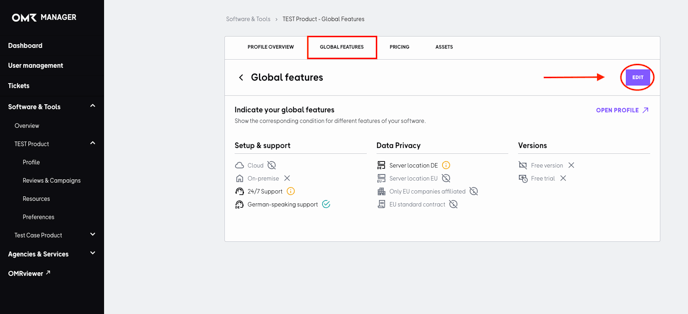
First go to the “Global features” tab and click on the “Edit” button.
Step 2
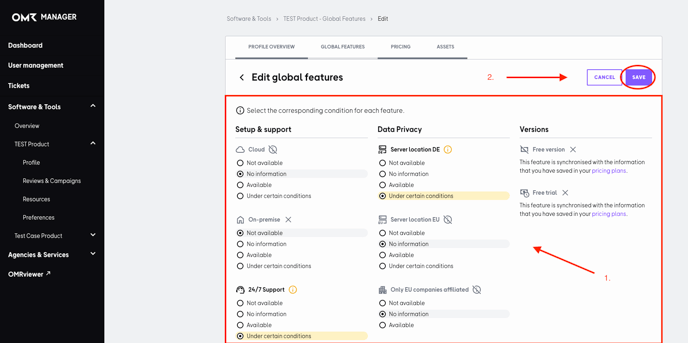
Now you can select the appropriate information about the features of your tool. Finally, click on the “Save” button to save the changes.